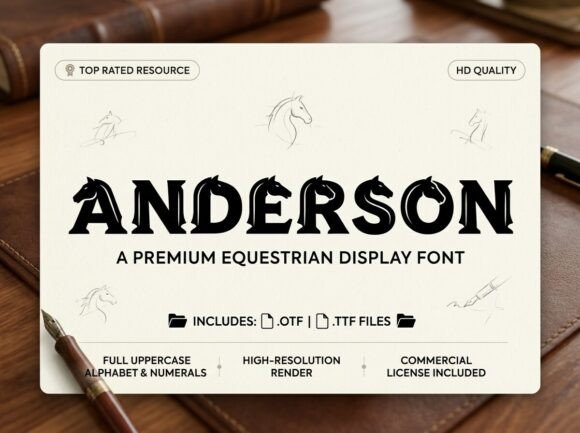
Anderson Font: Bold Design for Headlines That Demand Attention
If you've ever spent hours scrolling through font libraries, searching for that one typeface that feels both unique and usable, you know the frustration. Most decorative fonts lean too far into novelty—they look interesting for a moment but fall apart in real-world applications. Others play it so safe they disappear into the background. Anderson is the rare exception: a display font with genuine artistic flair that still holds its own in professional contexts.
This isn't a typeface that whispers. Anderson was built to command attention, featuring distinctive letterforms with strong visual personality baked into every curve and angle. Each uppercase character feels like a small piece of art, which makes sense given its design philosophy. The creators clearly intended this for projects where typography isn't just functional—it's the main event.
Where Anderson Truly Shines
Think about the last time a logo stopped you mid-scroll. Or a book cover that made you pick it up from the shelf. Or a social media graphic that earned a save before you even read the caption. In most of those cases, the typography played a starring role. That's exactly the territory Anderson occupies.
For logo design, this typeface offers something difficult to find: built-in distinctiveness without sacrificing legibility. A brand name set in Anderson immediately communicates creativity, confidence, and intentionality. It works particularly well for businesses in creative industries—think boutique studios, artisan food brands, independent publishers, or lifestyle companies that want their visual identity to feel curated rather than generic.
Packaging designers will appreciate how Anderson handles the challenge of shelf presence. When your product sits alongside dozens of competitors, the right display font can be the difference between a glance and a pickup. Anderson's strong letterforms maintain their impact at various sizes, from large front-panel branding to smaller callout text on side panels. Just remember: this is an all-caps typeface, so plan your layout accordingly.
On social media, where you have roughly two seconds to capture attention, bold typography is non-negotiable. Anderson works beautifully for Instagram graphics, Pinterest pins, YouTube thumbnails, and promotional banners. Its decorative elements add visual interest without requiring additional illustration or design elements—sometimes a single word set in Anderson is all a graphic needs.
Practical Applications Beyond the Obvious
While Anderson excels at the headline-level work it was designed for, creative professionals often find unexpected uses for display fonts like this one.
Wedding and event invitations benefit enormously from typefaces with personality. Anderson's artistic character lends itself to formal yet creative stationery—especially for couples or event planners who want something that feels special without being overly traditional or whimsical.
Editorial designers working on magazine layouts, book covers, or report covers can use Anderson for chapter titles, pull quotes, or feature story headers. It pairs well with clean serif fonts for body text, creating a visual hierarchy that guides the reader's eye naturally.
For merchandise and print-on-demand products, Anderson's distinctive style translates well to apparel, tote bags, mugs, and posters. The all-caps design means every product looks intentional and cohesive, which matters when you're building a recognizable product line.
Digital product creators—those selling templates, planners, or online courses—can incorporate Anderson into cover designs, module titles, or promotional materials to establish a premium feel that justifies pricing.
Making the Most of an All-Caps Display Typeface
Here's where practical knowledge matters. Anderson is an all-caps typeface, meaning it includes only uppercase letters. This isn't a limitation—it's a deliberate design choice that serves specific purposes exceptionally well. But it does require thoughtful application.
Keep your text short. All-caps display fonts work best with headlines, brand names, taglines, and short phrases. Setting a full paragraph in an all-caps decorative typeface creates readability issues and diminishes the visual impact. Reserve Anderson for the moments that matter most in your layout.
Pair it strategically. Every display font needs a supporting cast. Anderson works alongside clean sans-serif fonts like Montserrat, Lato, or Open Sans for body text and secondary information. If your project calls for more warmth, try pairing it with a readable serif like Merriweather or Source Serif. The contrast between Anderson's decorative character and a simpler companion font creates visual balance.
Test at multiple sizes. Before committing to Anderson for any project, render your actual text—not placeholder copy—at the sizes you'll use. Display fonts can behave differently at 72 points versus 24 points. What looks stunning as a poster headline might lose detail at smaller sizes, so verify that the letterforms remain clear and impactful in your specific context.
Consider spacing carefully. Decorative display fonts often benefit from adjusted letter spacing. Anderson's artistic elements may look even better with slightly increased tracking, giving each character room to breathe. Experiment with spacing adjustments in your design software to find the sweet spot for your particular application.
Font Pairing: Building a Complete Typographic System
No single typeface can carry an entire brand identity or design project. The most effective visual communications use a small, intentional selection of fonts that work together. Anderson serves as the bold, attention-grabbing member of that system.
A practical approach: choose Anderson for primary headlines and hero text, select a complementary sans-serif for subheadings and navigation, and pick a highly readable serif or sans-serif for body copy. This three-tier system covers virtually every design need while maintaining visual consistency across platforms.
When testing pairings, create sample layouts with real content rather than Lorem Ipsum. Set your actual business name, your real tagline, and representative body text. This reveals how the fonts interact in practice—something generic placeholder text can't show you.
What You're Getting and What to Know
Anderson ships in two professional formats: OTF (OpenType Font) for advanced design applications like Adobe Creative Suite, and TTF (TrueType Font) for broad compatibility across operating systems and software. Both formats ensure your typography renders consistently whether you're designing in Illustrator, working in Canva, or setting up a website.
Before purchasing, verify that an all-caps display typeface aligns with your project needs. If your work requires lowercase letters for body text or extended paragraphs, you'll want to source a complementary font for those purposes. Anderson is specifically engineered for high-impact applications where every uppercase letter functions as a visual statement.
Also review the licensing terms for your intended use. Most premium font licenses distinguish between personal and commercial applications. If you're using Anderson for client work, merchandise, or products you sell, confirm that the license covers those uses. Understanding these details upfront prevents complications later.
The best typography decisions happen when you match font personality to project goals with intention. Anderson isn't trying to be everything—it's a specialized tool designed for creators who want their headlines, logos, and key visual elements to carry genuine artistic weight. Used thoughtfully, it becomes the kind of design asset that makes people pause, look closer, and remember what they saw.